As your freelance business grows, using to-do lists and spreadsheets may no longer be enough.
You need a means to organize your client projects, keep track of deadlines (and deliverables), and give clients an easy way to review your work.

This is when freelance project management tools come to mind. But most of them are designed for teams and have advanced features you’ll probably never need.
I took the time to research and play around with the best project management tools for freelancers and came up with a shortlist.
Here’s what made the cut.
Summary: Best Project Management Software for Freelancers
Here’s how the top freelance project management tools stack up:
Software Best for Starting plan Ease of use Notion Flexible workspaces $10/month (yearly)
$12/month (monthly) Moderate Trello Visual Kanban boards $5/month (yearly)
$6/month (monthly)Easy Asana Complex and structured projects $10.99/month (yearly)
$13.49/month (monthly)Moderate ClickUp Advanced workflows $7/month (yearly)
$10/month (monthly)Moderate Airtable Data-driven projects and customizability $20/month (yearly)
$24/month (monthly)Moderate Todoist Simple task management $5/month (yearly)
$7/month (monthly)Easy Bonsai Freelance business management $9/month (yearly)
$15/month (monthly)Easy Basecamp Client collaboration $15/month Easy monday.com Visual boards and workflows $9/month (yearly)
$12/momth (monthly)Moderate
These are the best project management apps for freelancers.
Notion
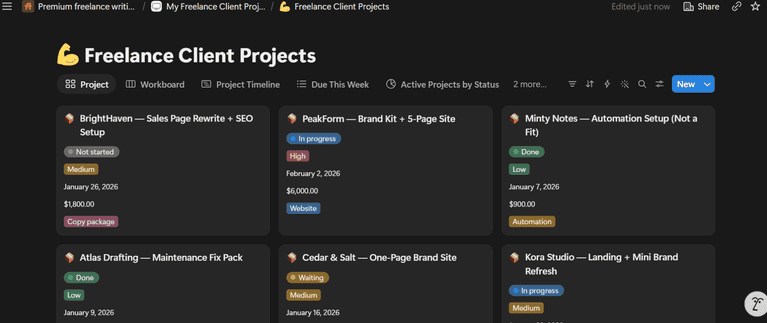
Notion brings together different freelancing apps in one workspace: project management, note-taking, documentation, database, and automation. It is free to use and very customizable. You can get started with free (or paid) project management templates, which you can edit to simplify your day-to-day freelance work schedule.
Notion may take some time to learn if you want to build your project management (PM) workspace from scratch. But you can handle pretty much your entire freelance workflow on Notion.
For example, as a freelance content marketer, you can create a workspace with briefs, deadlines, drafts, revisions, client feedback, time tracking, and invoicing.
Once you’ve built your freelance workspace, you’ll have little to worry about client deadlines and adding new projects. Don’t overthink it; just build a space that will make your work as simple as possible for you and your clients.
Features of Notion
- View projects by status, timeline, calendars, and Kanban
- Create tasks and sub-tasks
- Set project status, assignee, and due date
- Use project management templates
- Track time spent on tasks
- Build Notion docs and Wikis (or knowledge base)
- Structure databases for any workflow
Notion Pricing
- Free plan
- Plus: $10 per user/month (billed annually) and $12 per user/month (billed monthly)
- Business: $20 per user/month (billed annually) and $24 per user/month (billed monthly)
Notion Pros
- It is very customizable
- An all-in-one productivity tool
- Great for freelancers who want a simple workspace
Notion Cons
- It has a slight learning curve
- Larger workspaces take time to load
- Mobile app lags a little
Who it’s for: Notion is for freelancers who want a fully customizable workspace that houses their entire business.
Trello
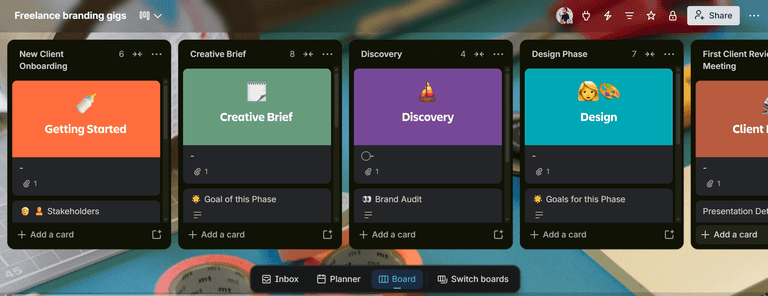
Trello is a visually appealing kanban-focused project management (PM) tool. You get to manage your client projects with boards, cards, and lists—in that order. Trello is easy to get the hang of, and you can drag cards (or tasks) around from “to do” to “done.”
The Trello free plan should be enough for your day-to-day client workflow, but some useful features are locked in the paid plans. You’ll need to install Power-Ups or subscribe to access features like calendar views, custom fields, dashboard views, list colors, timeline view, and table view.
As a one-person team, you could have a board for content creation and another for client work. Though if you’re running large projects, your cards can fill up your screen and turn into visual clutter.
Features of Trello
- Capture notes and save to-dos from email, Slack, and Microsoft Teams
- Organize tasks with boards and cards
- Use Planner for managing your task schedule
- Build your workspace using Trello templates
- Summarize and generate boards with Trello AI
- Track your cards (and individual tasks) across multiple boards
- Install 200+ Power-Ups or integrations
Trello Pricing
- Free plan
- Standard: $5 per user/month (billed annually) and $6 per user/month (billed monthly)
- Premium: $10 per user/month (billed annually) and $12.50 per user/month (billed monthly)
- Enterprise plan: starting at $17.50 per user/month (billed annually) and $210.00 per user/month (billed monthly)
Trello Pros
- Great visual overview of your project
- It keeps things simple enough for freelancers
- Good Power-Ups or integrations are available on the free plan
- The customizable Kanban board is refreshing
Trello Cons
- Some basic features aren’t available in the free plan
- It is not suitable for large and complex projects
- It’s challenging to manage projects with hundreds of cards.
Who it’s for: Trello is best for visual thinkers who want simple boards to manage their work.
Asana
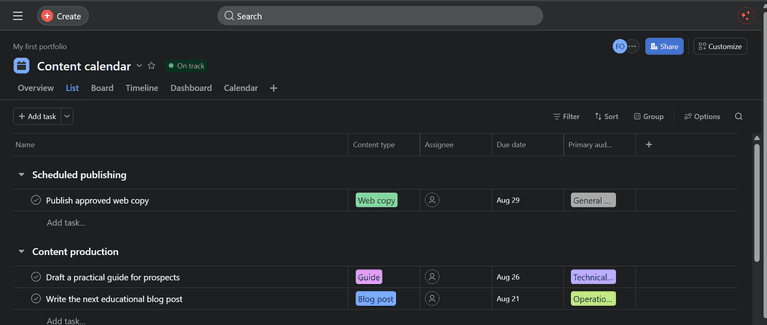
Asana is a tool that looks like ClickUp and Trello had a baby. It has bits and parts of the robust ClickUp work management features and eye-catching (user-friendly) interface of Trello.
Asana offers unlimited tasks and projects on the free plan, which should be enough for your client and personal projects. If you’re working on big projects with a lot of dependencies, you can upgrade your plan to use AI agents and automations to work more efficiently. Bear in mind that the AI Studio feature for creating automations has credit caps for each paid plan.
Asana isn’t as customizable or flexible as, say, Notion, but its workspace is intuitively mapped out. You’d hardly lose track of a task or item except when your project grows over time.
Features of Asana
- Access to pre-built AI agents with shared memory across your workspace
- Switch between list, boards, timeline, calendar, and dashboard views
- Get instant status updates
- Track the time spent on tasks
- Use AI Studio for busy work and workflow automations
- Check the reporting dashboard for project analytics
- Customize project templates and fields
- Build forms for collecting information from guest users
Asana Pricing
- Personal plan: $0
- Starter: $10.99 per user/month (billed annually) and $13.49 per user/month (billed monthly)
- Advance: $24.99 per user/month (billed annually) and $30.49 per user/month (billed monthly)
- Enterprise: Talk with sales
Asana Pros
- Sleek and intuitive UI
- Unlimited tasks, projects, and storage in the free plan
- It is fairly easy to use
- Complete project management tool
Asana Cons
- Only one assignee per task
- Extra costs of AI Studio credits for building automations
- Slight learning curve for advanced features
Who it’s for: Asana is best for freelancers working with subcontractors or a small team on large projects.
ClickUp
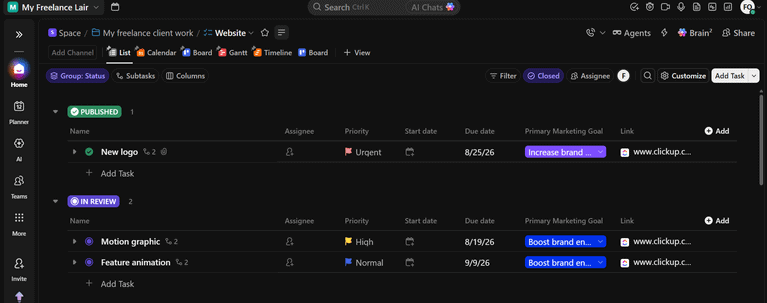
On the first-look, you’d be overwhelmed by the endless flow of buttons and UI on the ClickUp workspace. But with time, you will learn the features you need to manage your work and stay productive.
ClickUp has a project hierarchy that involves workspaces, spaces, folders, and tasks. If you’re setting up your freelance workspace, you could label it as freelance retainers for “workspace”, “spaces” for individual clients, and “folders” for projects and tasks. You could also add subtasks under each task with project statuses.
ClickUp has sufficient work management features to get things done and have a clear view of where you’re at. And the free plan is a good base or HQ for all your freelance work.
I do think ClickUp is bloated with a lot of fancy features (similar to Asana and Monday), but you only need to use the ones that fit your freelance use case. Most days you’d be filtering through ‘Inbox, My Tasks, and spaces’ to know which task to prioritize or backlog.
Features of ClickUp
- Use ClickUp Brain AI and agents for automation
- See list, kanban, calendar, Gantt chart, table, whiteboard, and workload views
- Access collaborative docs, knowledge base, and notes
- View project reports and analytical dashboards
- Customize community project templates
- Transcribe and take meeting notes
- Stay in the loop with notifications, task alerts, and updates
- Manage hourly gigs with time tracker, time estimates, and timesheets
ClickUp Pricing
- Free Forever
- Unlimited: $7 per user/month (billed annually) and $10 per user/month (billed monthly)
- Business: $12 per user/month (billed annually) and $19 per user/month (billed monthly)
- Enterprise: custom pricing
ClickUp Pros
- Advanced project management features
- Freelancer-friendly free plan
- Useful automations and AI agent abilities
- Great integrations
ClickUp Cons
- It takes time to learn
- 60MB storage limits in the free plan
- It can load slowly sometimes
Who it’s for: ClickUp is good for freelancers who need robust project management workflows.
Airtable
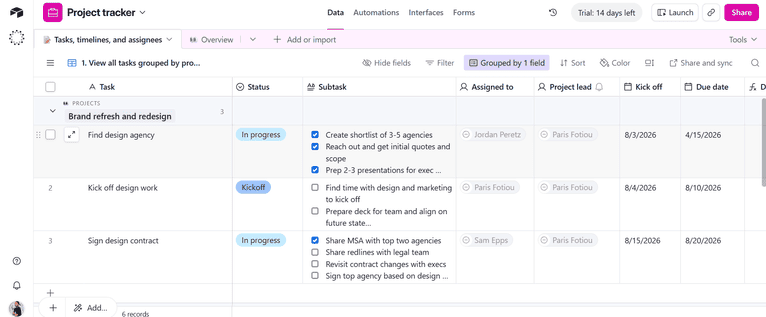
Airtable connects spreadsheets to a database and gives it automation and agentic abilities. It has a database where all your client and project records live and a front-facing interface for your clients and team.
Airtable helps you build whatever project management workflow you can think of. It’s more like building a no-code PM app on top of the platform, which you have total control of from the backend (or database) to the interface.
If you keep to a basic workspace, the free plan should be okay for you. You can build a project management tool, social media content calendar, invoice app, portfolio, and time tracker inside your freelance base. You won’t be restricted to the guardrails in traditional project management tools; instead, you get to design your very own base.
Features of Airtable
- Get AI assistance and build custom apps with Omni AI
- Use databases to connect data from apps, workflows, and tools
- Automate tasks and databases with AI agents
- Bring in guest users with the Portals feature
- Build custom project management interfaces
- Monitor project analytics
- Display your projects in list, grid, kanban, calendar, dashboard, and gallery
Airtable Pricing
- Free plan
- Team: $20 per user/month (billed annually) and $24 per user/month (billed monthly)
- Business: $45 per user/month (billed annually) and $54 per user/month (billed monthly)
- Enterprise Scale: custom pricing
Airtable Pros
- It is super flexible
- Build a custom project management tool for your use case
- Connects spreadsheets and databases
- Access to automations in the free plan
Airtable Cons
- It requires a lot of customization
- Time and technical expertise to build your workspace
- Basic mobile app with limited functionalities
Who it’s for: Airtable is for tech-savvy freelancers (like developers) who want to create a project management software that is unique to the way they work.
Todoist
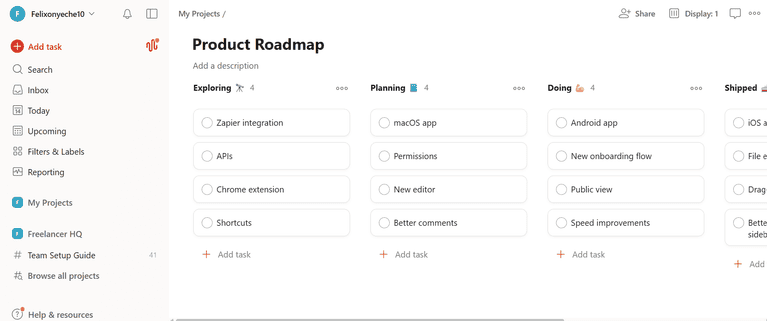
Todoist is a task management app that can double as project management (PM) software. It is commonly used to block out time for personal to-dos like cleaning the house and walking the dog, as well as basic work tasks. But it can also be sufficient for your freelance business or a side hustle like a YouTube channel.
The Todoist free plan is limited to 5 projects, so if you work with many clients, you’ll need to consider the Pro or Business plan.
One workaround is to have a project for personal stuff and other projects for individual clients, say client A, client B, and client C. Then you can create tasks under each client project with priority level, labels, and so on. You can also name the services you offer as projects and create client tasks under the projects.
I believe creative freelancers with fixed deliverables like UX/UI designers and copywriters will find Todoist most helpful because their workflow can be easily broken down into individual tasks and deadlines.
Features of Todoist
- Prioritize tasks with labels, assignees, and due dates
- Turn your talk into tasks with the Ramble feature
- Connect with popular tools like Gmail, Google Calendar, Outlook, Slack, and Zapier
- Create projects with building blocks
- Visualize your project in list, calendar, and board
- Start out with project templates
- Set daily and weekly goals
Todoist Pricing
- Beginner: free
- Pro: $5 per user/month (billed annually) and $7 per user/month (billed monthly)
- Business: $8 per user/month (billed annually) and $10 per user/month (billed monthly)
Todoist Pros
- Easy-to-use productivity app
- Efficient task management tool
- Fair pricing
- Sync across Desktop, Android, IOS, and wearables
Todoist Cons
- It is not ideal for complex projects
- No built-in time tracker
- Limited storage
- It’s not that customizable
Who it’s for: Todoist will be a good fit for freelancers who want a simple system to manage client tasks, schedule, and get things done.
Bonsai
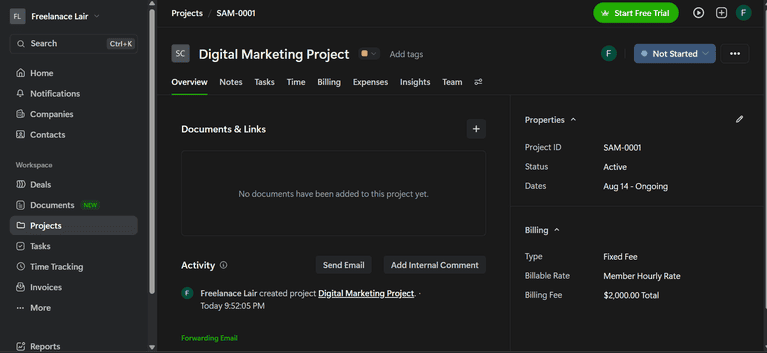
Bonsai is a business management software that helps you manage your clients, contracts, projects, tasks, time, expenses, invoices, and payments.
Bonsai will be a smart choice if you prefer having one tool for your freelance business rather than using multiple apps and integrations. The product is user-friendly and allows your client to log in to approve and review projects without any hassle.
However, Bonsai may not be your best option if you need advanced project management features. The mobile app has some limitations, particularly with detailed time tracking, while some integrations require third-party tools like Zapier.
Features of Bonsai
- Plan projects and tasks, recurring tasks with lists, Kanban boards, and Gantt charts
- Track billable time with time tracking and timesheets
- Set project budgets based on fixed fees or hourly work
- Manage clients with a CRM, client records, scheduling, and a client portal
- Create proposals and contracts for client onboarding
- Send invoices and accept online payments from clients
- Track your freelance expenses and income
Bonsai Pricing
- Basic: $9 per user/month (billed annually) and $15 per user/month (billed monthly)
- Essentials: $19 per user/month (billed annually) and $19 per user/month (billed monthly)
- Premium: $29 per user/month (billed annually) and $30 per user/month (billed monthly)
- Elite: $49 per user/month (billed annually) and $59 per user/month (billed monthly)
Bonsai Pros
- All-in-one business app for freelancers
- Keeps projects and admin work in one place
- Create good proposals and contracts
- Useful time tracking feature
Bonsai Cons
- No free plan
- The Basic plan is missing some key features
- Lack of built-in AI capabilities
- It can become expensive
Who it’s for: Bonsai is great for freelancers who want to run their entire business in one place.
Basecamp
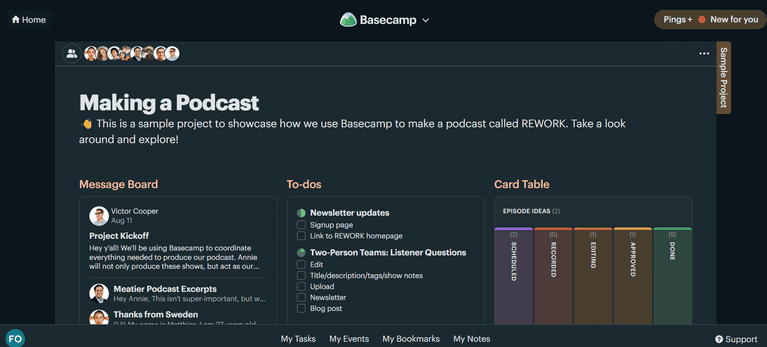
Basecamp is a simplified, out-of-the-box project management tool. It centers on client communication and small-team collaboration.
Basecamp would help you a lot if you work frequently with subcontractors and need to keep clients in sync. You don’t have many customization options in Basecamp, but it gives you a clear picture of how your projects are progressing.
The free plan is limited to one project, so you might need to upgrade to the Pro plan to run your freelance business. You can try it out and upgrade if it works for you. But if you want to make do with the free plan, you could compile different client work in a single project.
Features of Basecamp
- Structure projects with project pages containing the tools you need
- Manage tasks using to-do lists, due dates, files, and subtasks
- Visualize work through kanban-style card tables and project stages
- Discuss projects through Message boards and real-time Campfire chats
- Control client access while collaborating on shared work
- Automate recurring check-ins with your team
- Monitor work across projects using Everything Views
Basecamp Pricing
- Free plan
- Pro: $15 per user billed monthly
- Pro Unlimited: $299 per month billed annually
Basecamp Pros
- Easy to adopt
- Simplified project management workflow
- The Pro Unlimited plan has no per-seat fees
Basecamp Cons
- No Gantt chart
- Absence of task dependency feature
- No detailed reporting
- Limited project customization
Who it’s for: Basecamp is best for freelancers who regularly work with a small team of subcontractors.
monday.com
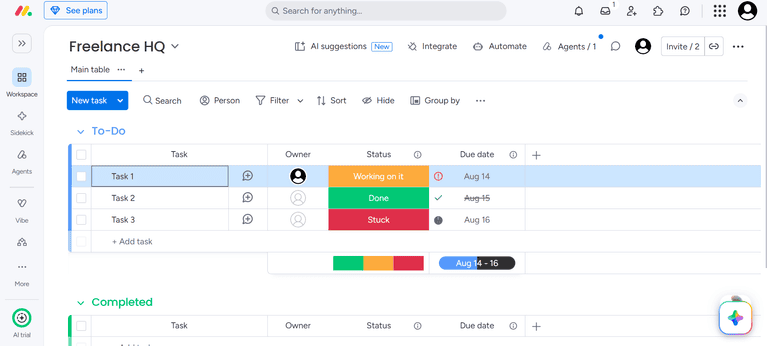
monday.com has long since branched out into CRM, service management, and software development products. But it’s still best known for project management. It was designed with large and small teams in mind, but freelancers can still have a bite of the cherry.
It has a visually appealing product interface, and it’s loaded with powerful features for teams. The free plan is quite limited compared to similar work management platforms.
On the free plan, you’d be limited to 3 boards and docs for organizing client work. If you prefer to separate your client deliverables or tasks into different containers, it wouldn’t suit you. But the free plan is practical if you can nest all your client deliverables or tasks under 3 boards.
Features of monday.com
- Choose from 200+ templates
- Run workflow automations
- Employ AI agents in different aspects of your business
- Get quick assistance with the AI Sidekick chatbot
- Save your SOPs and client details in docs
- Track real-time analytics and reports
- Connect with other tools in the monday marketplace
- Vibe code apps on the platform
monday.com Pricing
- Free plan
- Basic: $9 per user/month (billed annually) and $12 per user/month (billed monthly)
- Standard: $12 per user/month (billed annually) and $14 per user/month (billed monthly)
- Pro: $19 per user/month (billed annually) and $24 per user/month (billed monthly)
- Enterprise: Get a quote from sales
monday.com Pros
- Advanced project management features
- Suitable for complex projects
- Intuitive and visually appealing interface
monday.com Cons
- Paying for 2 extra seats in the Basic plan as a solo freelancer
- Only 3 boards and 200 items in the free plan
- It has a learning curve
Who it’s for: monday.com is for freelancers who manage large projects or contracts with subcontractors and other collaborators.
Which Freelance Project Management Software Should You Choose?
One tool I could have included was the traditional Google Sheets and Excel. Many freelancers swear by these traditional spreadsheets and use table formulas and automations to log some project details.
That being said, take your time to experiment with the free plan or trial for the listed project management tools to see which one meets your needs. You should go for a product only if it’s user-friendly, has capable features for your use case, and makes sense financially.
Which freelancing apps do you use to manage client work that should have made the list? I’d love to hear from you in the comments.